top of page


Photogrammetry
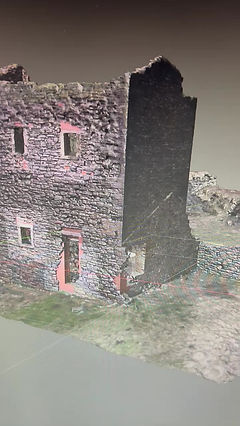
About Photogrammetry
Photogrammetry is a technology used to measure and analyze real-world objects and environments by using photographs.
By taking multiple overlapping images of an object or area from different angles, photogrammetry software can calculate distances, shapes, and spatial relationships to create accurate 3D models, maps, or measurements.
The core principle relies on triangulation: when the same point appears in two or more images, its exact position in three-dimensional space can be determined.
Photogrammetry is widely used in many fields. In surveying and mapping, it helps create detailed topographic maps and terrain models. In architecture and construction, it is used to document buildings, monitor progress, and assess structural conditions.
Archaeologists use photogrammetry to digitally preserve historical sites and artifacts, while filmmakers and game developers use it to create highly realistic digital environments and characters.
I first came across Photogrammetry as an engineer; to have a representative 3D model of a highly radioactive environment reduced the dose uptake of repeated visits to the active area for survey and planning.
Modern photogrammetry often works with drones, which can capture high-resolution images from the air quickly and safely. Compared to traditional measurement methods, photogrammetry is faster, cost-effective, and non-contact, making it ideal for fragile or hard-to-reach objects. As cameras, drones, and software continue to improve, photogrammetry is becoming an essential tool for accurate digital documentation of the physical world.
Whats involved if i want to get into Photogrammetry
1. Planning and Image Capture
The process begins with planning camera positions to ensure good coverage and overlap (usually 60–80%). Photographs are captured using DSLR cameras, mirrorless cameras, smartphones, or drones. Common capture tools include DJI drones, Sony/Canon cameras, and flight-planning apps like DJI Pilot, Pix4D Capture, or DroneDeploy. Consistent lighting and sharp focus are essential for accurate results.
2. Image Import and Alignment
Photos are imported into photogrammetry software, which detects matching features across images and aligns them. This step creates a sparse point cloud representing the scene’s structure. Popular software includes Agisoft Metashape, RealityCapture, Pix4Dmapper, and Meshroom (open-source).

Process

Photo Overlapping
3. Dense Point Cloud Generation
The software calculates millions of points to form a dense point cloud, capturing fine geometric details. This step is computationally intensive and benefits from powerful CPUs and GPUs.
4. Mesh Creation
The dense point cloud is converted into a 3D mesh made of triangles. The mesh defines the object’s shape and surface.
5. Texturing and Export
High-resolution textures are generated from the original photos and applied to the mesh for realism. The final model is then exported to formats such as OBJ, FBX, or PLY for use in CAD, GIS, game engines, or visualization tools like Blender, Unity, or Unreal Engine.
This workflow enables accurate, scalable, and cost-effective 3D reconstruction of real-world objects and environments.
A good easy subject for beginners
Choose a subject without reflective surfaces.
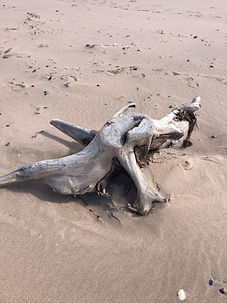
Here is a photo of the base of an old tree i found washed up on the shore
Here you see all the photographs i've taken; 66-images, with a Sparce Point Cloud

Fully Rendered Model, also showing camera positions

Photogrammetry Fun
My wife makes Cakes, and i like motorcycles
(Use your mouse to view the models in 3D)
bottom of page